
Download EDS Gif Camera APK – Free Android App, Gif Creator, Mobile Utility, Lightweight Tool
Overview
EDS Gif Camera is a free Android application developed by EDS Mesh Media, designed to simplify the creation of animated GIFs using a smartphone’s built-in camera. The app targets casual users, social media enthusiasts, and content creators who want to produce short, engaging visual clips without the complexity of advanced video editing tools. It enables users to capture moments in motion and convert them into shareable GIFs with minimal effort.
The primary purpose is to provide a streamlined workflow for creating fun, expressive content ideal for platforms like Instagram, Snapchat, and TikTok. The app is particularly useful for generating reaction GIFs, quick memes, or spontaneous clips that capture real-time emotions and interactions. While the developer did not provide detailed information about the app’s background or technical development process, it is positioned as a lightweight, accessible tool for everyday users.
Its simplicity and focus on speed make it suitable for individuals of all technical skill levels. The app is designed to be used on the go, allowing users to record and save GIFs in seconds. It is available for download on the Google Play Store and is compatible with most Android devices.
The developer did not specify any system requirements or hardware limitations.
Key Features & Capabilities
- Three-Click Recording Process – Launch the app, press record, and save the GIF. This streamlined workflow minimizes user effort and ensures quick content creation.
- Instant GIF Generation – Captured video clips are automatically converted into animated GIFs, eliminating the need for manual editing or file conversion.
- Lightweight Design – The app is optimized for minimal storage usage, making it ideal for devices with limited space.
- Direct File Saving – GIFs are saved directly to the device’s file system, allowing users to access and share them easily.
- Simple Interface – The user interface is minimalistic and intuitive, focusing on core functionality without distractions.
These features enable users to create short, dynamic visuals for social media, messaging apps, or personal entertainment. For example, a user can quickly record a funny reaction or a spontaneous moment and share it with friends on WhatsApp or Instagram Stories. The app’s simplicity makes it ideal for users who prioritize speed and ease over advanced editing options.
While specific technical details about frame rate, duration limits, or export settings were not provided, the app appears to be optimized for quick, on-the-fly content creation. It is particularly well-suited for casual users who want to express themselves visually without investing time in complex tools. The absence of in-app purchases or ads was not confirmed, but the app is marketed as free to download and use.
User Interface, Workflow & Performance
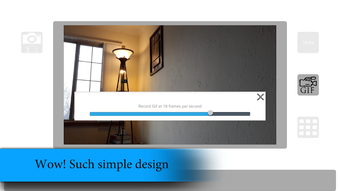
The user interface of EDS Gif Camera is designed around simplicity and speed. The main screen features a large central recording button, with minimal visual clutter and no unnecessary menus. Navigation is straightforward: opening the app initiates the recording mode, and a single tap starts and stops the capture.
The workflow is optimized for one-handed use, allowing users to operate the app with ease while holding their phone. After recording, the app automatically processes and saves the GIF, with no additional steps required. The developer did not specify resource usage details, so exact performance behavior in terms of CPU or RAM consumption remains unknown.
However, the app’s lightweight nature suggests it operates efficiently on devices with modest hardware. Stability and crash reports were not provided, and no information was given about background operation or battery impact. General software behavior patterns suggest that such a minimal app is unlikely to cause significant system strain.
The lack of complex processing or external dependencies contributes to a smooth user experience, assuming standard device performance. Users can expect minimal lag during recording and immediate access to their created GIFs.
Compatibility & System Requirements
EDS Gif Camera is available for Android devices and is compatible with most smartphones running the Android operating system. The app is distributed through the Google Play Store, indicating support for devices that meet standard Android requirements. The developer did not specify the minimum Android version or hardware specifications such as RAM, processor, or storage capacity.
The app’s file size is not listed, but it is described as lightweight, suggesting it occupies minimal space on the device. Installation size and system requirements were not provided in the available information. The developer did not indicate whether the app supports tablets or other form factors.
Compatibility with specific Android versions, such as Android 8.0 or later, cannot be confirmed. Users should ensure their device meets general Android app requirements to install and run the application. The developer did not provide any details about cloud integration, offline functionality, or updates beyond the standard Play Store distribution.
Pros and Cons
Pros
- Free to download and use with no in-app purchases mentioned
- Simple three-click workflow for fast GIF creation
- Minimal interface designed for ease of use
- Lightweight design with low storage footprint
- Direct file saving for easy sharing
Cons
- Exact system requirements and supported Android versions were not specified
- No information on video duration limits or frame rate settings
- Performance behavior under heavy usage was not documented
- Limited customization options for GIF output
- Developer did not provide details on update frequency or future development plans
FAQ Section
Is EDS Gif Camera safe to use?
The app is available on the Google Play Store and does not require special permissions. It is designed to access only the camera and storage, which are necessary for its core functionality. No external data collection or tracking was mentioned by the developer.
Can I use EDS Gif Camera offline?
Yes, the app functions entirely offline. No internet connection is required to record, process, or save GIFs.
Is the app available for iOS devices?
The app is currently only available for Android. There is no information about an iOS version or future release plans.
How often does the app receive updates?
Update frequency was not specified by the developer. Users can expect updates through the Google Play Store when available.
What file format does the app use for saved GIFs?
EDS Gif Camera saves created content as standard animated GIF files, which are widely supported across social media platforms and messaging apps.
Final Thoughts + CTA
EDS Gif Camera delivers a focused, no-frills solution for creating animated GIFs on Android devices. Its strength lies in simplicity—users can record and save GIFs in seconds with minimal effort. While detailed technical specifications and customization options are not available, the app excels in accessibility and speed, making it ideal for casual users and social media content creators who value efficiency.
The lightweight design ensures it won’t burden older or lower-end devices. Although advanced features like trimming, looping, or frame control are absent, the app fulfills its core purpose effectively. For those seeking a free, straightforward tool to capture and share fun moments, EDS Gif Camera is a solid choice.
It’s particularly well-suited for quick reactions, memes, or spontaneous clips. The app’s availability on the Google Play Store adds to its credibility and ease of access. Download EDS Gif Camera now to start creating fun, shareable content in seconds.





.png)

